
What to Consider Before Choosing a Remote Access Solution
Remote access is not just a way to reach a terminal. For connected-device teams, it is an operating model for identity, support, accountability, and scale.

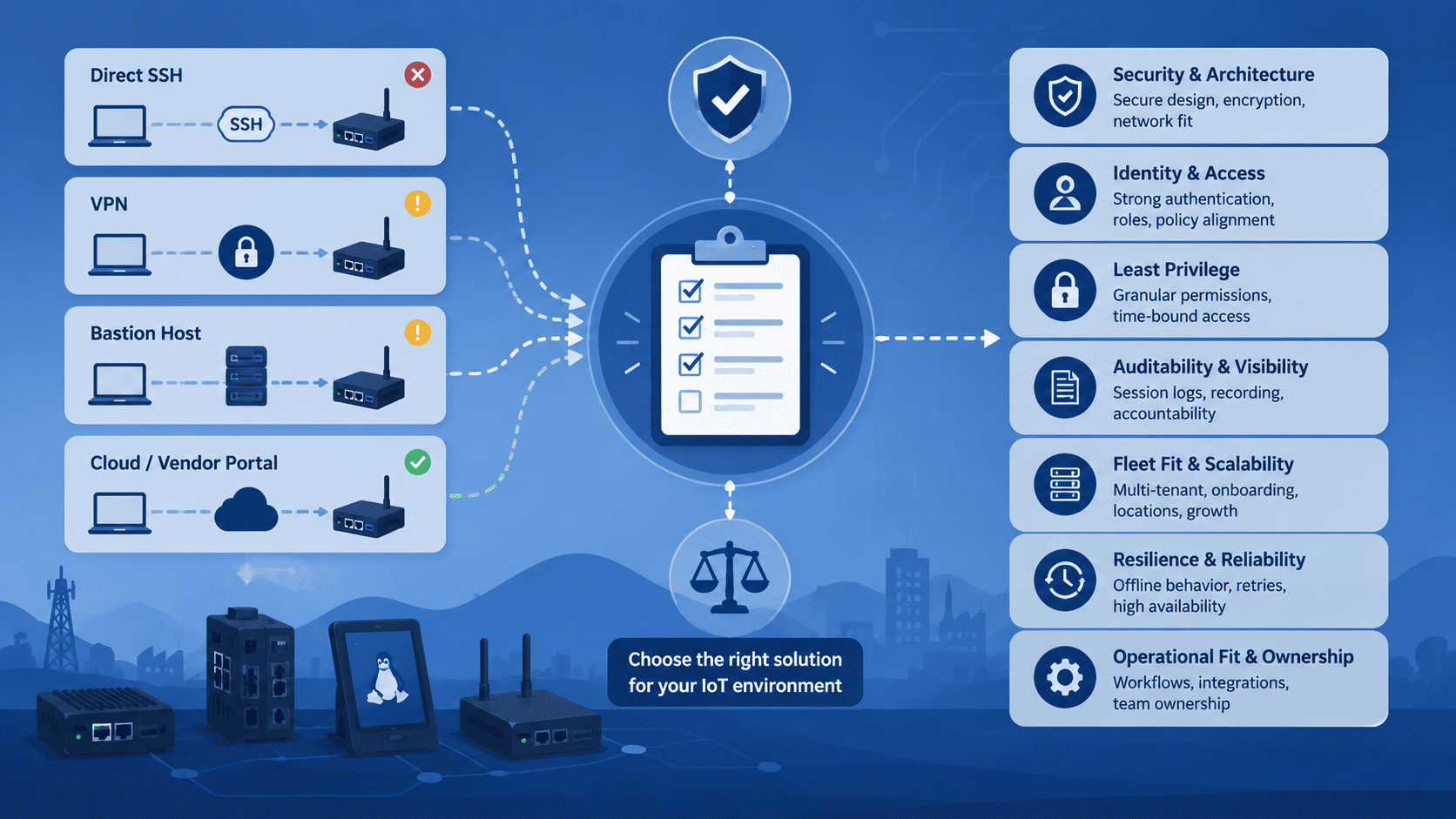
A practical evaluation framework for secure, supportable access to connected Linux devices.
A remote-access problem often arrives disguised as a support request.
A device in the field needs investigation. An engineer needs a shell. The device sits behind a customer network, cellular connection, NAT, or a firewall. The immediate question is simple: How do we connect to it?
The more important question is: What operating model are we creating every time someone needs access?
A shortcut can make one device reachable today while creating a long-term problem with exposed services, shared credentials, unclear approvals, or incomplete records of privileged work. A more deliberate approach can help teams diagnose issues remotely while keeping access bounded, attributable, and workable as the number of devices, users, and environments grows.
This is why choosing a remote-access solution should not start with a feature checklist alone. It should start with the operational conditions the solution must support.
Start with the network reality, not the ideal network diagram
Many connected devices do not have stable, directly reachable network paths. They may be installed behind carrier-grade NAT, customer firewalls, private networks, or intermittent cellular links. Even when a public address is technically possible, exposing an administrative service to the internet changes the security and maintenance burden.
A useful evaluation starts with concrete questions:
- Does the device need an inbound port opened, a public IP address, or a permanent VPN path?
- Can the device establish the outbound connection required by the chosen access architecture?
- What happens when the network changes, the IP address rotates, or connectivity is intermittent?
- Which parts of the access path are owned by the device maker, the operator, and the customer?
There is no universal architecture that fits every fleet. A VPN can be appropriate when teams need broader private-network connectivity between managed sites. A bastion host can be a valid pattern for a controlled server environment. Direct SSH can be appropriate for tightly managed infrastructure with a well-designed network boundary.
But a connected-device fleet often has different constraints. The access path must work across customer networks without making each device an internet-facing administrative endpoint. The solution should make this design explicit, rather than treating it as an installation detail.
It must also be honest about reachability. No remote-access platform makes an offline or otherwise unreachable device available. During a proof-of-concept, test the actual outbound network path from representative device environments.
Evaluate identity before evaluating connectivity
Being able to reach a device is not the same as being able to govern access to it.
In early deployments, access often follows the fastest available path: a shared account, a copied SSH key, a vendor credential, or a tunnel maintained by one person. These mechanisms can work technically, but they become harder to control when support grows, contractors join, teams change, or a customer asks who accessed a system and why.
A remote-access solution should let the organization answer basic identity questions:
- Who is requesting access?
- How is that person authenticated?
- Which team, customer environment, or project are they permitted to access?
- How is access removed when a role, contract, or incident changes?
- Can policies follow the organization instead of relying on manual device-by-device configuration?
Look for a model that aligns access with named people and defined roles. Where the risk warrants it, require stronger authentication and avoid treating a device credential as the complete identity model.
This matters because remote access is privileged access. The terminal may be familiar, but the decision around who can reach it is an identity and authorization decision.
Ask whether least privilege is practical in daily operations
A tool can claim to offer access control while still encouraging broad, permanent access in practice. The test is whether a support lead can grant the minimum necessary access without creating operational friction that causes people to bypass the system.
During an evaluation, examine the actual controls available to administrators:
- Can permissions be scoped by device, group, environment, or customer boundary?
- Can teams separate development, staging, production, and support responsibilities?
- Can temporary collaborators receive access without inheriting a broad set of credentials?
- Is revocation straightforward and visible?
- Can the organization avoid using one shared administrative account for every support case?
The goal is not to make engineers less effective. It is to make necessary access specific, reviewable, and reversible.
A useful proof-of-concept should include an access-change scenario, not only a successful connection. Add one user, grant a limited scope, test it, then remove it. If that sequence is unclear or expensive, the access model may not hold up under real operating pressure.
Treat auditability as an engineering requirement
When remote work is performed on field devices, an access log is not only a security artifact. It is operational context.
After an incident, a team may need to know whether someone connected to a device, when that happened, and what support activity occurred around the same time. During a handover, a record can reduce the dependence on individual memory. In regulated or customer-sensitive environments, traceability may also be a contractual or governance expectation.
Assess what the system records and how usable that record is:
- Are access events tied to individual identities?
- Are timestamps, target devices, and connection context available?
- Does the record support investigation without exposing unnecessary sensitive data?
- How long are records retained, and who can review them?
- Can the information fit the organization’s incident-response and compliance processes?
The right level of recording depends on risk, privacy obligations, and the type of maintenance performed. The important point is to decide deliberately. “We can check who still has the key” is not a reliable audit process.
Test the workflow your support team will actually use
A remote-access platform can look strong in a lab and still fail the real support workflow.
The proof-of-concept should mirror a representative scenario: a device on a constrained network, an engineer using their normal terminal workflow, a defined approval or access policy, and an incident that requires a second person to understand what happened.
Evaluate the experience from both sides.
For the engineer:
- Can they connect using a familiar, documented workflow?
- Is the path reliable enough for diagnosis and maintenance?
- Are failure states understandable?
- Does the tool introduce an extra step that is justified by the control it provides?
For the operator or administrator:
- Can they locate the correct device without relying on informal knowledge?
- Can they see its relevant context, such as environment, ownership, or status?
- Can they approve, revoke, or review access without a manual cleanup project?
- Can they support users without becoming the bottleneck for every connection?
Usability is a security consideration here. If the approved route is difficult to use under pressure, an unmanaged route will eventually appear.
Look beyond a single device
The right answer for five devices may not be the right answer for five hundred.
As fleets grow, remote access becomes intertwined with inventory, ownership, lifecycle management, and team structure. The solution does not need to replace every device-management system, but it should fit the way the organization identifies and organizes devices.
Ask how the platform handles:
- Device enrollment and removal.
- Naming, grouping, tags, or other contextual organization.
- Multiple customer or business-unit boundaries.
- Different environments and support tiers.
- Personnel changes and access reviews.
- Integration with the organization’s existing identity, logging, and operational processes.
Also examine the failure path. If the central service is unavailable, if a device loses connectivity, or if a credential must be revoked quickly, what is the documented response? A good remote-access design accounts for these conditions before a field incident forces the discussion.
Consider lifecycle, ownership, and exit paths
Remote access is rarely a one-time implementation. Agents, certificates, keys, policies, logs, and administrator responsibilities all have a lifecycle.
Before selecting a solution, establish who will own:
- Initial rollout and device onboarding.
- Credential and policy administration.
- Software updates and compatibility testing.
- Monitoring of access failures and service health.
- Offboarding devices, users, and customers.
- Data retention and incident review.
Vendor evaluation should include practical questions about deployment options, update procedures, documentation quality, support boundaries, and how the organization can export or retain the records it needs. The aim is not only to adopt a tool, but to avoid building an access process that no one can maintain after the first rollout team moves on.
If you are evaluating self-hosting, include the production DNS/domain and HTTPS/TLS setup, applicable public gateway, API, and SSH exposure, reverse-proxy or load-balancer compatibility, backups, monitoring, and update ownership. If you are evaluating a managed cloud option, clarify which operational responsibilities remain with your team. In every model, confirm agent and platform compatibility before rollout.
A practical evaluation scorecard
Before a buying decision, ask each candidate to prove its approach against the same scenario. A useful scorecard covers seven areas:
- Network architecture: Does it work across NAT, firewalls, private networks, and real connectivity constraints without casually exposing administrative services?
- Identity and authentication: Can access be tied to named users and the organization’s security policy?
- Authorization: Can access be limited by device, group, environment, customer, and role?
- Auditability: Can the team review access events and investigate support activity when needed?
- Operator workflow: Can engineers use the solution reliably with clear failure modes and a familiar path?
- Fleet fit: Can the model remain manageable as devices, customers, and teams grow?
- Lifecycle ownership: Are deployment, maintenance, revocation, retention, and exit responsibilities clear?
A product demonstration should answer more than “Can you open a terminal?” It should demonstrate how the system handles one authorized connection, one denied connection, one access change, and one post-incident review.
Where ShellHub fits
For teams that need governed SSH access to distributed devices, servers, and containers, ShellHub is designed around a device-access workflow rather than broad private-network access. Its agent establishes an outbound connection to the ShellHub Server. This can support access to devices behind NAT, CGNAT, or restrictive firewalls without exposing an inbound SSH port on the device, provided that the device can reach the ShellHub Server through the required outbound network path.
Teams can centrally manage SSH public keys, namespace membership and roles, and SSH firewall rules to control which users and connections can reach which devices. ShellHub also creates session records for SSH connections to support auditability. In ShellHub Cloud and Enterprise, interactive SSH sessions can be recorded and replayed in the Web UI.
That makes ShellHub relevant to evaluations where the goal is not simply reachability, but controlled access, traceability, and a workable path for device fleets. The appropriate next step is still a proof-of-concept against the team’s own network, identity, device compatibility, and support requirements.
The decision is really about operational confidence
The best remote-access solution is not the one with the longest list of connectivity features. It is the one that lets a team support devices without losing control of who can reach them, what access is appropriate, and how the work can be understood later.
For IoT and embedded Linux teams, that is the standard worth testing: not only whether the terminal opens, but whether the operating model remains secure and manageable when the next device, customer, engineer, and incident arrive.